Book Structure
Overview
The structure of a Quarto book can be as simple as a list of chapters, or can alternatively incorporate multiple parts and/or appendices. Quarto book chapters and sections are automatically numbered (for cross-referencing), however you can also specify that some parts of the book should remain unnumbered.
The simple book configuration generated by quarto create-project illustrates the basics:
book:
  title: "mybook"
  author: "Jane Doe"
  date: "5/9/2021"
  chapters:
    - index.qmd
    - intro.qmd
    - summary.qmd
- references.qmd- The index file is required and includes preface, acknowledgements, etc. Headings in the index file are unnumbered by default.
- The remainder of
chaptersincludes one or more book chapters. - The
references.mdfile will include the generated bibliography (see References below for details).
Titles
Since rendering options are provided in _quarto.yml, you’ll typically see a simple level-one header at the top of chapters. For example:
# IntroductionNote that the following is also still perfectly valid:
---
title: "Introduction"
---
Chapter Numbers
All chapters are numbered by default. If you want a chapter to be unnumbered simply add the .unnumbered class to its main header. For example:
# Resources {.unnumbered}You can mix together numbered and unnumbered chapters. Note however that while you can link to unnumbered chapters, you can’t cross reference figures, tables, etc. within them. Unnumbered chapters are therefore mostly useful for prefatory content or references at the end of your book.
Section Numbers
You can set the numbering depth via the number-depth option. For example, to only number sections immediately below the chapter level, use this:
number-depth: 1Note that toc-depth is independent of number-depth (i.e. you can have unnumbered entries in the TOC if they are masked out from numbering by number-depth).
References
You should include a div with the id #refs at the location in your book where you’d like the bibliography to be generated. For example the references.md file generated by quarto create-project includes this:
# References {.unnumbered}

::: {#refs}
:::
Note that you can change the chapter title to whatever you like, remove .unnumbered to have it be numbered like other chapters, and add other content before or after the bibliography as necessary.
Creating an Index
For PDF output, you can create an index using the LaTeX makeidx package along with the \index command.
To add an index to the PDF output for a book, add these include-in-header and include-after-body entries to your pdf format configuration in _quarto.yml: quart
format:
  html:
    theme: cosmo
  pdf:
    documentclass: scrreprt
    include-in-header:
      text: |
        \usepackage{makeidx}
        \makeindex
    include-after-body:
      text: |
        \printindex
Then, add \index{entry} commands wherever you want an index entry. For example:
Markdown\index{Markdown} allows you to write using
an easy-to-read, easy-to-write plain text format.
Note that \index commands are automatically ignored for non-PDF output.
Parts & Appendices
You can divide your book into parts using part within the book chapters. For example:
chapters:
  - index.qmd
  - preface.qmd
  - part: dice.qmd
    chapters:
      - basics.qmd
      - packages.qmd
  - part: cards.qmd
    chapters:
      - objects.qmd
      - notation.qmd
      - modifying.qmd
      - environments.qmd
Note that the markdown files dice.qmd and cards.qmd contain the part title (as a level one header) as well as some introductory content for the part. If you just need a part title then you can alternatively use this syntax:
- part: "Dice"
  chapters:
    - basics.qmd
    - packages.qmd
You can include appendices by adding an appendices key to your book config. For example:
book:
  title: "mybook"
  author: "Jane Doe"
  date: "5/9/2021"
  chapters:
    - index.qmd
    - intro.qmd
    - summary.qmd
    - references.qmd
  appendices:
    - tools.qmd
    - resources.qmd
Parts and appendices show up like this in HTML output:
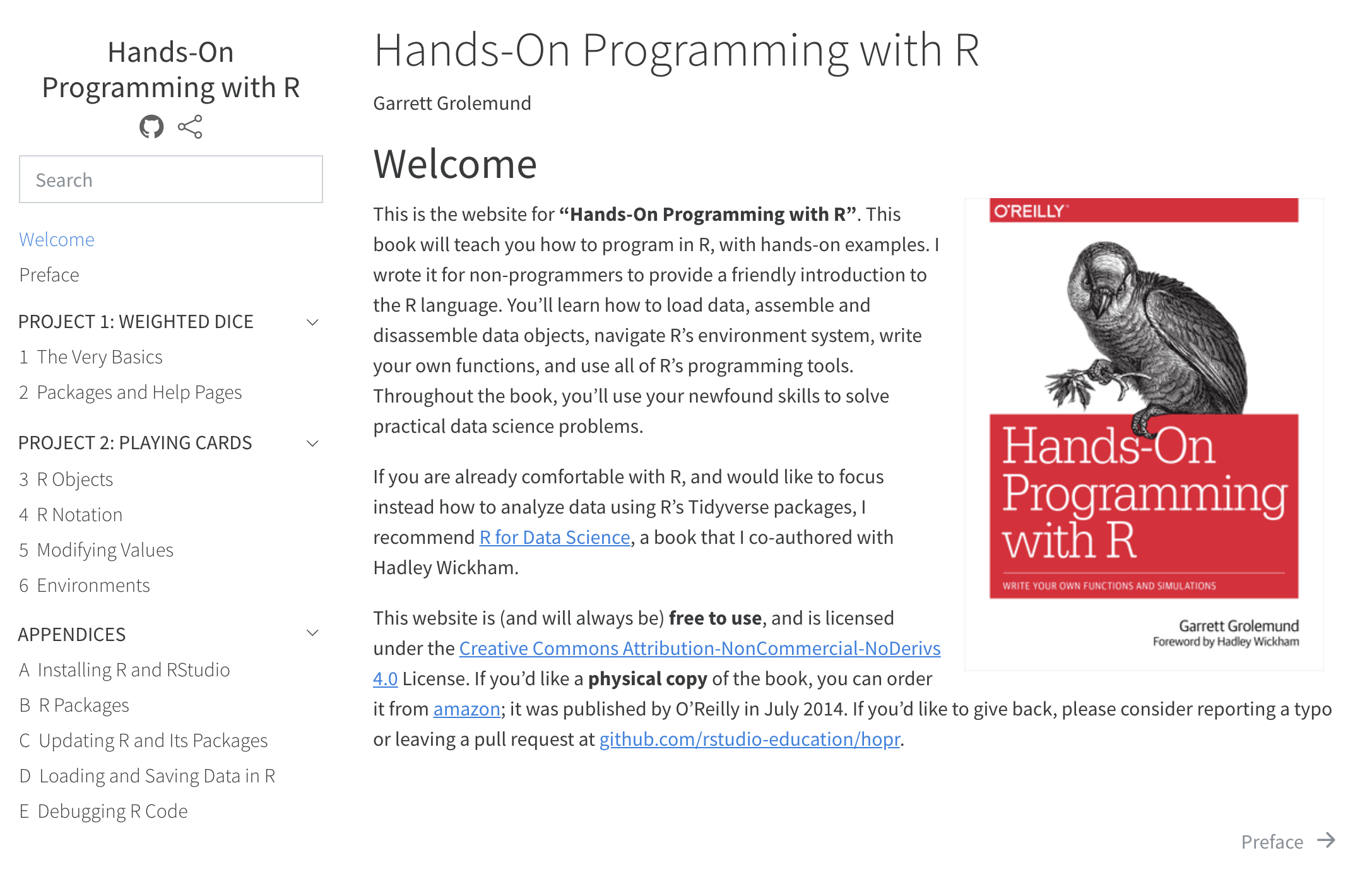
In LaTeX output, the \part command is used for parts. In EPUB and MS Word output parts are ignored entirely.
Appendices are numbering using uppercase alpha, and have a prefix inserted into their title to indicate they are an appendix (e.g. “Appendix A — Additional Resources”). You can customize the prefix and delimiter using the following options:
crossref:
  appendix-title: "App."
  appendix-delim: ":"
Which would result in the above example being output as: “App. A: Additional Resources”.